
Create Your Own Claude Skills: A Practical Way to Make AI Tools More Useful
Like everyone else, I’m constantly playing with AI to figure out how to use it in my workflows and make my life better. Also like everyone else, I’m overwhelmed by how much is changing and updating every day. I’ve been a software engineer for 15 years and I don’t remember ever feeling this overwhelmed. So let’s demystify and experiment with AI skills today. While I prefer GitHub Copilot, writing skills for Claude, Codex, Copilot, etc. are all the same thanks to the open specification (more on that later).
Why should you write your own skills?
There isn’t anything special about AI skills. Those written by experts are more detailed and so are more helpful, but if everyone uses them without their own additions or adjustments, we are all calling the same models with the same ideas. The best way to learn and understand something is to do it yourself. So lets do it!
For this article, I will be creating a skill for my own website to create an article. With my current website design, adding an article requires a new build (sub-optimal, but it works for a starter setup). There are various things that need to be in place in order for an article to appear on my site with the proper information:
- hero image in proper format for image processing/optimization
- actual markdown file with metadata and content
- an update to the overall article page Basically, it requires just enough work that it’s easy to forget something. But it’s repeatable and unique to my website, so it’s a good target for an AI skill.
Claude skill specification
The Open Skill specification can be found here. It requires very little information to get started but is extensible to be as detailed as you would like. As far as I know, all AI models follow this specification, so your skill will work no matter which AI vendor you choose.
Add our Claude skill
In GitHub Copilot, you can just type /create-skill into your CLI, give it a few details, and Copilot will create and place the file for you to edit and update.

In Claude, you can go to Customize > Skills and use the built-in skill creator.
I settled on the below skill for my workflow. It explains the conventions of my repository, the order in which to do things so nothing breaks, how to verify everything worked, minimum data to include, etc.
// Some details omitted for brevity
---
name: add-article-workflow

description: "Use when you need to add a new article to this site by creating the markdown content, the route page, and wiring it into the article listings and image mappings."
---

# Add a New Article to This Site

Use this workflow when you need to add a new article

## What this skill covers

- Creating article content in the correct locale content folder
- Adding a route page for the article in the matching pages tree
- Ensuring the article appears in the articles listing pages
- Adding image metadata when a custom article image is needed

## Required repository conventions

- Article frontmatter should include at least:
- `title`
- `pubDate`
- `description`
- `author`
- `tags`
- `type`


## Workflow

1. Determine the article slug and locale.

2. Create the markdown content file.

3. Create the matching route page.

4. Add article image metadata if needed.

5. Verify that the article is discoverable.


## Completion checks

- The markdown file exists in the correct content folder.
- The page renders through the article layout without missing imports.
- The article is included in the locale article listing.
- If custom imagery is needed, the image metadata has been added.

## Example prompt

Use this skill when you want to add a new article such as:
- "Add a new English article about secure AI-assisted development."
- "Create a Japanese version of this article and wire it into the Japanese route tree."
Now that our AI knows about our skill and we are happy with the intial draft, let’s test it!
Testing our new Claude skill
Now that we have our skill, let’s test it. Make sure you either start a new chat or reload your context to pick up the skill. Then you can either:
- type
/add-article-workflowand hit enter - Give your agent a prompt like “Add a new English article about how cool puppies are”
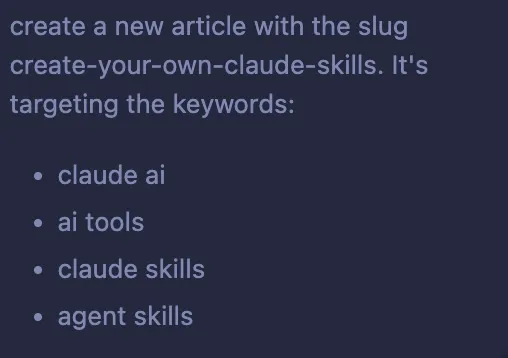
I used it to wire up this article itself. Here is the prompt I used.
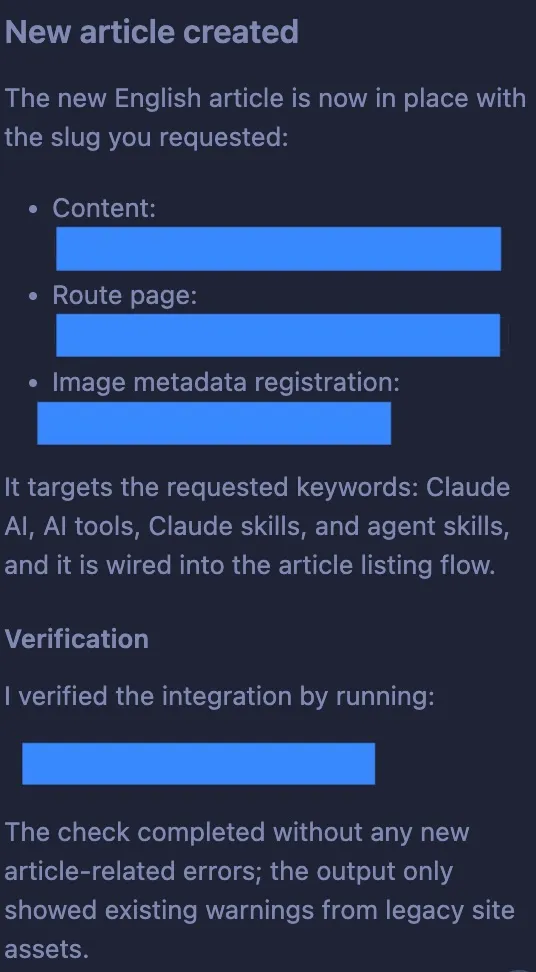
And it followed my workflow, verified that everything builds, and ensured everything is wired up. Now I just have to write my content.
Final thoughts and things to consider
If you look at places like awesome-copilot, skillregistry.io, and skills.sh, you will find plenty of skills to try. Many of them use npx to install, which makes sense because it is widely available and requires no configuration.
But with the recent supply chain attacks on npm, it is always a good idea to evaluate the commands you are running before you run them. Most skills are just markdown files, so the safest approach is to review the content first and copy it into your own skill files rather than piping it directly into your environment.
Some skills do include scripts and other dependencies, which can increase maintenance costs. If you manage a lot of agents, consider hosting your own skills in a Git repository or file share. That way you know exactly what you are running and nothing gets added without your review. It adds a bit of overhead, but as I discussed in Stay Safer with Dev Containers and Devcontainers in VS Code: Setup for Secure Development, these are the kinds of habits that keep your environment safe.
So absolutely use the skills written by experts. But do not be afraid to customize them and learn from them. Not everyone needs the same thing from their AI tools, so play around with them and make them your own.